
Subway Surfers IPA for iOS (2026) – Safe Installation Guide for iPhone & iPad
Subway Surfers is available for iPhone and iPad through Apple’s App Store. Install or update the official game there, and check the store listing for current device compatibility. This guide covers installation, updates, progress, and common troubleshooting.
Avoid unofficial IPA downloads and configuration profiles from unknown publishers. We cannot verify third-party files or guarantee their safety or support. Use the official App Store listing and SYBO support for help with installation, updates, or lost progress.

Version
3.56.15
IOS
Min 10.0
Size
213 Mb
What You’ll Need know before installation
App Name | Subway Surfers (official app) |
App type | Official base game |
Latest Version | See App Store listing |
File Size | See App Store |
Price | Free; optional in-app purchases |
Platform | iPhone and iPad via App Store |
Total Downloads | Not verified |
Developer | SYBO Games |
The Subway Surfers IPA for iOS gives players a fun wayAbout the Official iPhone and iPad App
Subway Surfers is available on the App Store, but many players look for Subway Surfers Mod IPA for iOS to access extra features such as unlimited coins, keys, unlocked characters, and older versions. IPA files allow users to install iOS apps manually using trusted tools.
This guide explains how to safely use the Subway Surfers iOS IPA, what you need, and how to avoid common installation issues.
Official App Store Installation Requirements
Before you begin, make sure your device is ready so you can install Subway Surfers IPA without any interruptions.
How to Install Subway Surfers IPA on iOS (2025 Method)
Follow these easy steps to install Subway Surfers Mod APK IOS. This process helps complete the Subway Surfers IPA install smoothly on supported iOS versions. If you also play on Android, you can follow our Subway Surfers APK guide for Android for a similar setup.
Step 1: Open the App Store
Follow these simple steps to safely download and install the Subway Surfers Old Version APK on your device.
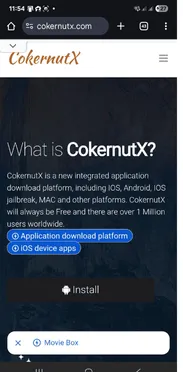
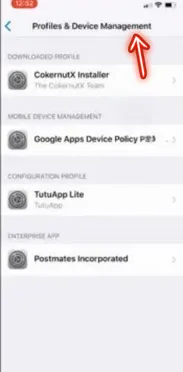
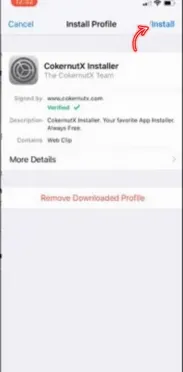
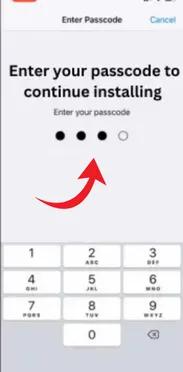
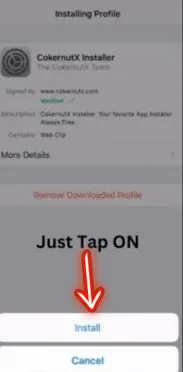

Step 2: Download the Subway Surfers Mod APK for IOS
Step 3: Install from the App Store
Important Note:
Unofficial IPA files and configuration profiles come from outside the App Store; we have not verified their safety, publisher, or support. For the official game, install and update through Apple’s App Store. Do not trust an unknown developer profile just to run a game.
Subway Surfers iOS Gameplay Tips
Subway Surfers runs very smoothly on most iPhone and iPad models, and a few simple adjustments can help you get even better performance and higher scores. iOS devices generally offer stable touch response which makes quick lane switching and swipe timing much easier during high-speed runs.
- Close background apps to prevent lag
- Increase brightness for better obstacle visibility
- Use headphones to react faster to in-game audio cues
- Clean your screen for more accurate swipes
- Use hoverboards often during high-speed runs
- Upgrade the 2× Multiplier early for faster score boosts
- Avoid unnecessary swipes at higher speeds.
The Subway Surfers IPA file for iPhone works best when your device has enough storage and updated iOS settings. These tips help maximise your performance and increase your high scores.
Common Mistake
Many users skip trusting the developer profile, and then the app crashes.
Make sure you go to Settings → General → Device Management and trust the profile before launching.
Safe Alternatives for iOS Users
If you can’t install or update the game, check App Store availability and the current device requirements. Restart your iPhone or iPad, then retry the download. If the issue continues, contact SYBO Support.
- Install the official Subway Surfers app from the App Store
- Check your iOS version and available storage
- Try older versions through verified backup tools
- Check Apple’s system status if downloads are unavailable
- Optimize your iPhone’s performance settings for smoother gameplay
For desktop players, our Subway Surfers for PC guide explains how to run the game smoothly on Windows or Mac.
Frequently Asked Questions
Conclusion
The Subway Surfers IPA for iOS gives players a fun way to enjoy unlimited coins, keys, characters, and more. It’s perfect for users who want an enhanced gameplay experience on iPhone or iPad. Just remember that IPA files may require occasional reinstalling if Apple revokes certificates. Download only from trusted sites and enjoy all the additional features safely. If you want to explore more game features, check out our Subway Surfers character unlock tips.